# Rút tiền về Ngân hàng liên kết

#### Bước 1: Tại màn hình Home, chọn Rút tiền <a href="#buoc-1-chon-menu-rut-tien" id="buoc-1-chon-menu-rut-tien"></a>

<figure><img src="https://2281469916-files.gitbook.io/~/files/v0/b/gitbook-x-prod.appspot.com/o/spaces%2FPsw9PfUEHlvhtmvvafFH%2Fuploads%2FnQugRTje8epOgtwHh51N%2F1.png?alt=media&#x26;token=8ba87bce-1403-41bf-b3f2-3aa31f2f28c2" alt="" width="302"><figcaption></figcaption></figure>

Trường hợp:&#x20;

* Tài khoản **chưa xác thực tài khoản (định danh eKYC)**, hệ thống hiển thị thông báo “**Chưa xác thực tài khoản**” → Chọn <mark style="color:red;">**“Xác thực ngay”**</mark> để tiến hành xác thực.
* Tài khoản **chưa liên kết ngân hàng**, hệ thống hiển thị thông báo “**Chưa liên kết ngân hàng**” → Chọn  <mark style="color:red;">**“Liên kết ngay”**</mark> để thực hiện liên kết.

<div><figure><img src="https://2281469916-files.gitbook.io/~/files/v0/b/gitbook-x-prod.appspot.com/o/spaces%2FPsw9PfUEHlvhtmvvafFH%2Fuploads%2FQ32QGZBIo6jtl7BV9CzE%2Fimage-20250704-032341.png?alt=media&#x26;token=08afb2be-98a4-46a3-b377-e8b4c4e21447" alt="" width="419"><figcaption></figcaption></figure> <figure><img src="https://2281469916-files.gitbook.io/~/files/v0/b/gitbook-x-prod.appspot.com/o/spaces%2FPsw9PfUEHlvhtmvvafFH%2Fuploads%2FQA8WIZ1B5HkrA82eDiAN%2Fimage-20250704-033454.png?alt=media&#x26;token=d48b7dc7-7b50-46c4-9da1-3b242ccc6552" alt="" width="422"><figcaption></figcaption></figure></div>

**Bước 2: Rút tiền**

Nhập số tiền cần rút-> chọn <mark style="color:red;">**Tiếp tục ->**</mark> chọn **tài khoản ngân hàng đã liên kết** để rút tiền về -> chọn <mark style="color:red;">**Xác nhận**</mark>

<div><figure><img src="https://2281469916-files.gitbook.io/~/files/v0/b/gitbook-x-prod.appspot.com/o/spaces%2FPsw9PfUEHlvhtmvvafFH%2Fuploads%2FGzc8YJ3B7WatJMIS6kPA%2Fimage-20250724-095136.png?alt=media&#x26;token=900f4cb8-d6e5-4b32-9800-1e7f57f7192e" alt="" width="301"><figcaption></figcaption></figure> <figure><img src="https://2281469916-files.gitbook.io/~/files/v0/b/gitbook-x-prod.appspot.com/o/spaces%2FPsw9PfUEHlvhtmvvafFH%2Fuploads%2Fr3C8IogN82XE4OFOEOEB%2Fimage-20250724-095115.png?alt=media&#x26;token=360210c5-f4dc-4ad1-b8be-2771f42cd8b4" alt="" width="301"><figcaption></figcaption></figure></div>

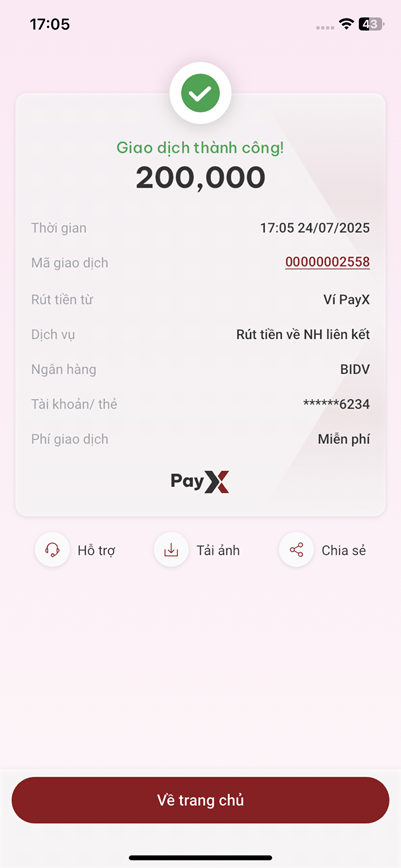
#### Bước 3: Xác thực giao dịch thành công

Tùy vào **số tiền rút**, hệ thống sẽ yêu cầu phương thức xác thực khác nhau như:

* **PayX Smart OTP**
* Xác thực khuôn mặt và **PayX Smart OTP**

✅ Sau khi nạp tiền thành công, hệ thống hiển thị kết quả giao dịch

<figure><img src="https://2281469916-files.gitbook.io/~/files/v0/b/gitbook-x-prod.appspot.com/o/spaces%2FPsw9PfUEHlvhtmvvafFH%2Fuploads%2F6A3hthfh9V0ZUtcY1y3l%2Fimage-20250724-100516.png?alt=media&#x26;token=8b531daf-8980-455b-b043-4dc4397c694f" alt="" width="301"><figcaption></figcaption></figure>